Best Tools to Track Lead Magnet Engagement (Free and Paid)
By Oleh Tsyupa, Founder of PDFTrackr · Published 2026-07-28 · Updated 2026-08-26
15 min readThe first page loses 36.4% of sessions before page two — more than pages two to twelve lose between them (32.1 points) — and the median reading session lasts 43.2 seconds.
When more than a third of reading sessions never reach page two, a download count is measuring the wrong thing: it records that a lead took the file, not that anyone read past the cover.
Based on 3,265 validated sessions from 1,564 first-time visits across 270 documents (PDFTrackr production analytics, 22 Sep 2025 – 25 Aug 2026, last day partial, extracted 26 Aug 2026). Figures are medians, not averages.
You can see this curve for your own document before reading any further: create a free tracked link — 50 files, 12 months of history, no card.
All 12 lead magnet tracking tools, compared by what they can see
The table grades each tool on the deepest signal it records about a lead magnet, not its feature count. Deepest signal runs in four steps: a form submit, a download click, an open, and per-page reading — someone read it, and you know which pages. Every cell comes from the vendor's own pricing or documentation, dated in the sources below.
| Tool | Job in the chain | Deepest signal it records | Free tier for that job | Hands the lead to a CRM or ESP |
|---|---|---|---|---|
| PDFTrackr | Deliver + measure | Per-page reading, automated opens excluded | Yes · 500MB · 50 files · 50 links · 12-month history | No native integration — export is a Pro feature |
| Papermark | Deliver + measure | Per-page reading | Yes · 50 docs · 50 links · 30-day history · last 20 views | Webhooks from €59 Business (annual) |
| Peony | Deliver + measure | Per-page reading | Yes · 50 docs · no published cap on tracked links · 30-day retention | Not stated on its pricing page |
| DocSend | Deliver + measure | Per-page reading (paid only) | No · 14-day trial | Visitor export from $10/user/month billed yearly ($15/user/month billed monthly) |
| HummingDeck | Deliver + measure | Per-page reading from $10/mo · free tier keeps no history | Yes · 5 docs · 5 links · real-time only | Close CRM and Slack from $25/user/mo billed monthly (or $20/user/mo billed annually, $240/yr) |
| HubSpot | Capture + nurture | Form submit, email opens, page views | Yes — plans start at $0, with email marketing on the free plan, on its pricing page, read 22 Oct 2026 | Yes — it is the CRM |
| Kit | Capture + deliver by email | Email opens and link clicks | Yes · Free plan · up to 10,000 subscribers | Yes — it is the ESP |
| OptinMonster | Capture | Impressions and conversions | No · 14-day money-back guarantee | Yes — integrations to major ESPs |
| Beacon | Build + capture | Leads captured (page views excluded for lead magnets) | Yes · 1 lead magnet/mo · 100 leads · 500MB | Yes — integrations |
| Google Analytics 4 | Measure the click | The click on the download link | Yes · free | No — it is analytics, not a contact record |
| Encharge | Nurture | Email opens, clicks, replies, page visits, form submits | No · 14-day trial | Yes — HubSpot and Salesforce sync on Premium, as we read it on 28 Jul 2026 |
| Foleon | Rebuild + measure | Deep in-content engagement, in Foleon's own format | No · paid, demo-led | Yes — marketing-stack integrations |
Where each tool stops measuring — the four steps
Run a lead magnet end to end and four moments are worth recording: a visitor submits the form, clicks through to the file, opens it, and reads some of it or does not. Marketing stacks measure the first two extremely well and the last two not at all — a dashboard headed “lead magnet performance” is almost always counting step one.
The clearest evidence is Google's own definition of the event most teams use as their download metric. GA4's enhanced measurement fires file_download:
“when a user clicks a link leading to a file (with a common file extension)”— Google Analytics 4 enhanced measurement documentation, fetched 2026-07-28
Read that literally: the event is the click. Its six parameters — file extension, file name, link classes, link ID, link text, link URL — describe the link, not the file. A cancelled download and a full read produce the same single event.
PDFTrackr sits at the far end of that chain, and the trade is explicit: it does not build your magnet or run your nurture sequence. If you need to know which leads read to the pricing page and which stopped on the cover, reading data is the qualifying signal your form cannot give you. The four groups below run deepest-first.
Group one: tools that measure reading inside the document
These five share a method: you upload the PDF, they host it and hand you a link, and their viewer records which page is on screen and for how long. That is why they can report reading depth and a marketing stack cannot. The trade-off is that the lead gets a hosted reading experience rather than a file to keep, unless you also allow the download.
PDFTrackr
PDFTrackr's free plan gives 500MB, 50 files, 50 share links and a 50MB per-file limit, with full page-by-page reading data on every one. For a lead magnet, three of its free-tier properties matter more than the volume. Automated opens are excluded from the counts — corporate email security and link previewers open a tracked link before the human does, and those hits do not become leads you score. History runs 12 months, against the 30 days that Papermark and Peony keep, which matters because an evergreen ebook keeps pulling downloads long after the campaign week. And every view is kept, where Papermark's free plan shows the most recent 20.
The rest of the free tier is the working kit for gated content: an optional email gate so each reading session carries a name, password protection, link expiry, download control, virus scanning on every upload, a daily email digest of the day's opens, and a “did it land?” readout — completion rate and the page where readers stopped — on your first document. Download clicks are counted too, as a count and rate per link.
Best for: the marketer who has to decide which of this month's downloads are worth a sales hand-off, and needs the open count to mean a person.
Honest weakness: it is a measurement tool, not a funnel: there is no form builder, no email sequencing and no native CRM integration, so the lead lands in PDFTrackr and you move it onward yourself. CSV export and real-time alerts are Pro features.
Pro is $9/month or $84/year and adds real-time open alerts, unlimited links with bulk personalised link creation, CSV export, folders, document versioning, 24-month retention and branding removal. Pro also correlates the two halves for you — how many pages a lead had read before they downloaded — so a download stops being a dead end in the report. Against the paid tiers in this group that is the lowest entry price for per-page analytics with viewer identification: DocSend's Personal plan is $10/user/month billed yearly ($15/user/month billed monthly), Papermark is €29/month billed monthly (€24/month billed annually) and Peony $30/admin/month billed annually.
Papermark
Papermark's core is open source, and on raw free-plan volume it matches PDFTrackr exactly: 50 documents, 50 links, one member, page-by-page analytics, email capture, password, expiry and download control, free. Two free-tier limits shape it for lead magnets — analytics are kept for 30 days and view history stops at the last 20 views (Pro caps at up to 1,000 last views; Business and Data Rooms are uncapped). Paid starts with Pro at €29/month billed monthly (€24/month billed annually); webhooks, email verification and the allow/block list start on the Business plan, not on Free or Pro.
Best for: teams that want an open-source document tracker they can audit, whose free plan sends an email each time a document is viewed.
Honest weakness: a 30-day analytics window and a 20-view free history are short for an evergreen lead magnet that keeps converting for months.
Peony
Peony is the volume leader of the free plans in this group: 50 documents, no published cap on tracked links, 500MB storage, a 50MB per-file limit, page-by-page analytics, email capture, real-time open alerts and password protection — free, with one admin and a 30-day retention window. Its document count and storage match PDFTrackr's exactly; the links are the difference, and for a campaign that needs a separate tracked link per channel, source or partner, that is a real advantage. Paid starts at $30/admin/month billed annually, where download prevention also begins.
Best for: campaigns that mint a distinct tracked link per channel or partner and do not want to count them.
Honest weakness: a 30-day analytics-retention window, no download-off control until $30/admin/month billed annually, and a single admin seat.
DocSend
DocSend is the incumbent for document analytics and its per-page tracking is strong, but it has no free plan — a 14-day trial, then Personal at $10/user/month billed yearly ($15/user/month billed monthly), which covers document-level analytics, real-time engagement, location and read/forward notifications plus a visitor export. Standard is $45/user/month annually. For a lead magnet that may pull thousands of anonymous downloads, per-seat pricing is the awkward part, not the depth.
Best for: teams already paying for DocSend on sales collateral who want the same instrument on gated content.
Honest weakness: no free tier at all, and per-user entry pricing scales with your team rather than with the campaign.
HummingDeck
HummingDeck has a permanent free plan — 5 documents, 5 links, 100MB — but its own plan table describes free analytics as real-time only, meaning no history is kept, and per-page analytics starts on the paid Starter tier at $10/mo billed monthly, 1 user (or $8/mo billed annually, $96/yr). Email capture sits higher still, on Pro at $25/user/mo billed monthly (or $20/user/mo billed annually, $240/yr), which is also where Close CRM and Slack integrations arrive. It is the one competitor in this group that markets email-scanner filtering, though its pages are ambiguous about the free tier.
Best for: light senders who want a deal-room style share and will pay for the analytics tier.
Honest weakness: five documents and no free history make the free plan unusable as a lead magnet tracker; the useful tier is paid, and email capture is two tiers up.
Group two: tools that capture the lead and stop at the form
These tools are excellent at getting the address and putting it somewhere useful, and none claims to see inside the file. The mistake is reading a form conversion rate as an engagement rate.
HubSpot
HubSpot is the CRM in this list: the lead magnet arrives as a form submission, the contact record is the point, and the follow-up runs from the same account. Its pricing page, read on 22 Oct 2026, starts its plans at $0, and the free plan includes email marketing. Nothing on that page described engagement inside a downloaded file. HubSpot's documents tool is the part that reports how a shared file was read: it is listed for Sales Hub and Service Hub at Starter, Professional and Enterprise, and for Smart CRM Professional and Enterprise, with no Free tier listed, and it reports views, unique visitors and average time spent viewing per document.
Best for: teams that want capture, contact records, and nurture in one system, with a permanent free tier under it.
Honest weakness: reading detail sits behind the paid documents tool, which reports views, unique visitors and average viewing time per document, with no per-page metric described on the pages we read.
Kit
Kit (formerly ConvertKit) is the delivery half of most creator lead magnets. Its pricing page lists the Free plan up to 10,000 subscribers: unlimited landing pages & forms, unlimited email broadcasts, audience tagging & segmentation, sell digital products & subscriptions. Creator is Creator $39/mo billed monthly ($33/mo billed yearly, $390/year), at the 1,000-subscriber position and Pro is Pro $79/mo billed monthly; billed yearly $66/mo, currently offered at $50/mo for the first year ($593 billed first year), at the 1,000-subscriber position, both priced at the 1,000-subscriber slider position rather than the free ceiling, with Pro adding Subscriber Signals and engagement analytics. Those analytics are email-side: opens, click tracking, and list-growth reporting showing which forms and pages people signed up through.
Best for: creators who deliver the magnet by email and want the whole list, tagging and automation stack free up to 10,000 subscribers.
Honest weakness: a click on the download link in the delivery email is the deepest engagement it can report on the asset itself.
OptinMonster
OptinMonster is a pure capture layer — exit-intent popups, slide-ins, campaign targeting and A/B testing — and it reports impressions, conversions and revenue attribution on those campaigns. It has no permanent free plan, and its pricing is introductory first-year pricing billed annually: Basic $9/mo ($108 billed today, renews at $210/yr), Plus $27/mo ($324, renews $570/yr), Pro $37/mo ($444, renews $870/yr), Growth $67/mo ($804, renews $1,470/yr), with a 14-day money-back guarantee rather than a free tier.
Best for: squeezing more conversions out of the traffic you already have, which is a different and often more valuable problem than measuring reading.
Honest weakness: no free plan, and its analytics are about the offer, not the asset — an impression and a conversion, then the trail ends.
Group three: tools that build the magnet
A tracker cannot help you if the ebook does not exist yet — and PDFTrackr does not address that at all. We track documents you already have; we do not make them.
Beacon
Beacon builds lead magnets, resource libraries and lead capture forms, and its free plan is permanent: one lead magnet per month, 100 leads, 1,000 monthly page views, 500MB of storage and a single user. Lite is $19/month, Professional $49 and Agency $99. Its reporting is lead-count-based rather than engagement-based, and its own pricing table is unusually candid about the boundary:
“Page views only apply to Resource Libraries and Lead Capture Forms, NOT Lead Magnets”— Beacon pricing page footnote, fetched 2026-07-28
The page views are counted where the form is, not where the reading is. Beacon is a builder, labelled as one, and pairs sensibly with a tracker.
Best for: turning a blog series or a slide deck into a designed ebook without a designer, free for one magnet a month.
Honest weakness: the analytics are about leads captured, not about what those leads read — its own pricing footnote says page views exclude lead magnets.
Foleon
Foleon goes deepest on in-content engagement of anything on this page, and it does so by changing the asset: content is published as a Foleon Doc in its own interactive format rather than as a PDF you already have. There is no self-service free plan and pricing is demo-led. If you will rebuild the lead magnet in a proprietary format it tells you more about how the content was consumed than a PDF tracker can; if you will not, your existing PDF is not what it measures.
Best for: content teams standardising on interactive publications rather than PDFs.
Honest weakness: you rebuild the asset in Foleon's format, there is no free tier, and pricing is not published.
Group four: tools that measure the click
Both are already in most stacks, both are useful, and both are routinely credited with knowing more than they do.
Google Analytics 4
GA4 is free and its enhanced measurement fires file_download automatically for the common extensions — pdf, xlsx, docx, txt, rtf, csv, zip and the rest — with no tagging work at all. It is the right tool for the question “which channel drove downloads”, and it answers that well. It is the wrong tool for “did they read it”, because as its own documentation states, the event is the click on the link. Everything after the click happens outside GA4's field of view.
Best for: attributing downloads to channels and campaigns, free, with no implementation work.
Honest weakness: it measures a click on a link, so a cancelled download and a cover-to-cover read are the same event.
Encharge
Encharge is marketing automation built around behavioural triggers: it tracks how many people open, click and reply to your flows and emails, plus page visits and form submissions on your website in real time. There is no permanent free plan — a 14-day trial, then — on Encharge's own pricing page as we read it on 28 Jul 2026 — Growth at $99/month for up to 2,000 subscribers ($79 billed yearly) and Premium at $159/month ($129 yearly), where HubSpot and Salesforce sync arrive. Its signal set is the richest of the marketing-side tools here, and every signal in it is still a site or email event.
Best for: behaviour-triggered nurture flows once the lead is captured.
Honest weakness: no free plan, and the behaviour it can trigger on stops at your site and your emails — not inside the document.
Three tools that beat PDFTrackr, plainly
PDFTrackr wins the measurement job on this page and loses three others outright.
- Peony beats us on free link volume. Its free plan carries tracked links with no published cap where ours caps at 50, with identical document counts and storage. If your campaign mints a link per channel, per partner and per test, Peony is the honest pick.
- Beacon beats us on making the thing. We track documents; we do not build them. Beacon designs the ebook, hosts the resource library and captures the lead, free for one magnet a month. If the asset does not exist yet, start there and bring the finished PDF back to a tracker.
- HubSpot beats us on the funnel around the file. Free marketing email on a $0 plan, with the contact record and automation in the same account. PDFTrackr has no form builder, no sequences and no native CRM integration, so the split is clean: HubSpot owns the contact, we own what that contact read.
The verdict that follows from all three: PDFTrackr is the right pick for the measurement job, and none of those three competes for it — free page-by-page reading with automated opens excluded, a 12-month window rather than 30 days, every view kept rather than the last 20, all on the free tier, no card. It sits alongside the capture stack you already run rather than instead of it: build in Beacon, capture in HubSpot or Kit, deliver the tracked link instead of the file and read each lead's furthest page to decide who gets the same-day call.
The paid tier sits on that same seam. Per-page reading is free here and stays free; what free does not do is hand you a per-viewer file to load somewhere else. Upgrade to Pro, $9/month, once you are scoring leads somewhere other than PDFTrackr — the per-viewer CSV export gives a row per viewer — their email address when the gate is on, otherwise a cookieless per-day identity, so an ungated reader appears once per day rather than once in total — plus how many times they opened it, a page-view count and when — which is the row you paste beside the contact record HubSpot or Kit already keeps. That is what makes the division above workable: the export is the wire between the two. Pro also lifts the 50-link cap Peony beats us on and mints personalised links in bulk rather than one at a time — though Peony publishes no cap on tracked links free, so that half is a convenience you are paying for, not a gap you have to close.
What our own reading data says about lead magnets
Ours comes from PDFTrackr's anonymised production analytics.
The median reading session lasted 43.2 seconds and the 90th-percentile session ran 6.13 minutes; the median time on a single page was 3.02 seconds.
Page one loses 36.4 percentage points before page two, while pages two through twelve lose 32.1 between them. The cover sheds more sessions than the whole rest of the document.
Most reading sessions do not run far, so the leads whodo read deep are a small, high-value minority a download count cannot find for you. Reading data does not make more of your leads engaged; it tells you which already are.
There is a second reason to distrust a raw open count. A lead magnet link is usually delivered by email, so it meets the corporate security machinery that opens links to check them before people click. In our own production data, roughly one recorded view in seven had zero page engagement — opened by software, read by nobody. PDFTrackr excludes automated opens from your counts, and the principle holds whichever tool you use: score on reading depth, never on the raw open.
How we evaluated these tools
Every cell comes from the vendor's own pricing page or documentation, never a third-party listicle. Marketing-stack tools and GA4 docs were fetched 2026-07-28 (HubSpot, Kit and OptinMonster re-read 2026-10-22); document-tracker rows come from our browser-verified competitor matrix of 2026-07-17, and the vendor pricing pages behind them were re-read 2026-09-19. Every source below carries its own fetch date rather than inheriting a blanket one, and a read past the 30-day window this site aims at carries that date rather than passing as current. For each tool we recorded its job in the chain, the deepest engagement signal it publishes, and whether a permanent free plan exists for that job rather than a trial. Where a vendor does not publish a fact we write “not stated” rather than estimate. Dollar figures are the vendor's own where it publishes them and a flagged estimate where it does not. We re-verify monthly.
Frequently asked questions
What are the best tools to track lead magnet engagement?
It depends which job you mean. For reading inside the document: PDFTrackr, Papermark, Peony, DocSend and HummingDeck — the first three have permanent free plans with page-by-page analytics. For capture and nurture: HubSpot and Kit, both with free tiers. For building the magnet: Beacon, free for one a month. GA4 is free and measures the download click only.
Can I track lead magnet engagement for free?
Yes. PDFTrackr's free plan gives page-by-page reading data on 50 files and 50 links with 12 months of history and automated opens excluded from the counts. Papermark and Peony also give free per-page analytics; Papermark and Peony both keep a 30-day window. HubSpot and Kit are free for capture and delivery — Kit's free plan to 10,000 subscribers — but on the pages we read they report form submits, opens and clicks rather than anything inside the file.
How do I know if someone actually read my lead magnet?
Share it as a tracked link rather than a file download, and read the per-page time. A download count tells you the file was taken; per-page dwell tells you which pages were on screen and for how long. Send the raw PDF as an attachment and no tool can tell you what happened to it.
Does Google Analytics track PDF downloads?
It tracks the click on the download link. GA4's enhanced measurement fires a file_download event, in Google's own words, "when a user clicks a link leading to a file (with a common file extension)", and records the extension, file name and link details. It records nothing about whether the file was opened or read.
Which lead magnet tools have a permanent free plan?
PDFTrackr, Papermark, Peony, HummingDeck (5 documents, no history), HubSpot's free plan, Kit's free plan to 10,000 subscribers, Beacon (1 lead magnet a month) and Google Analytics 4. OptinMonster, Encharge, DocSend and Foleon have none — OptinMonster offers a 14-day money-back guarantee, the others a trial or demo.
How do I tie lead magnet reading back to a specific lead?
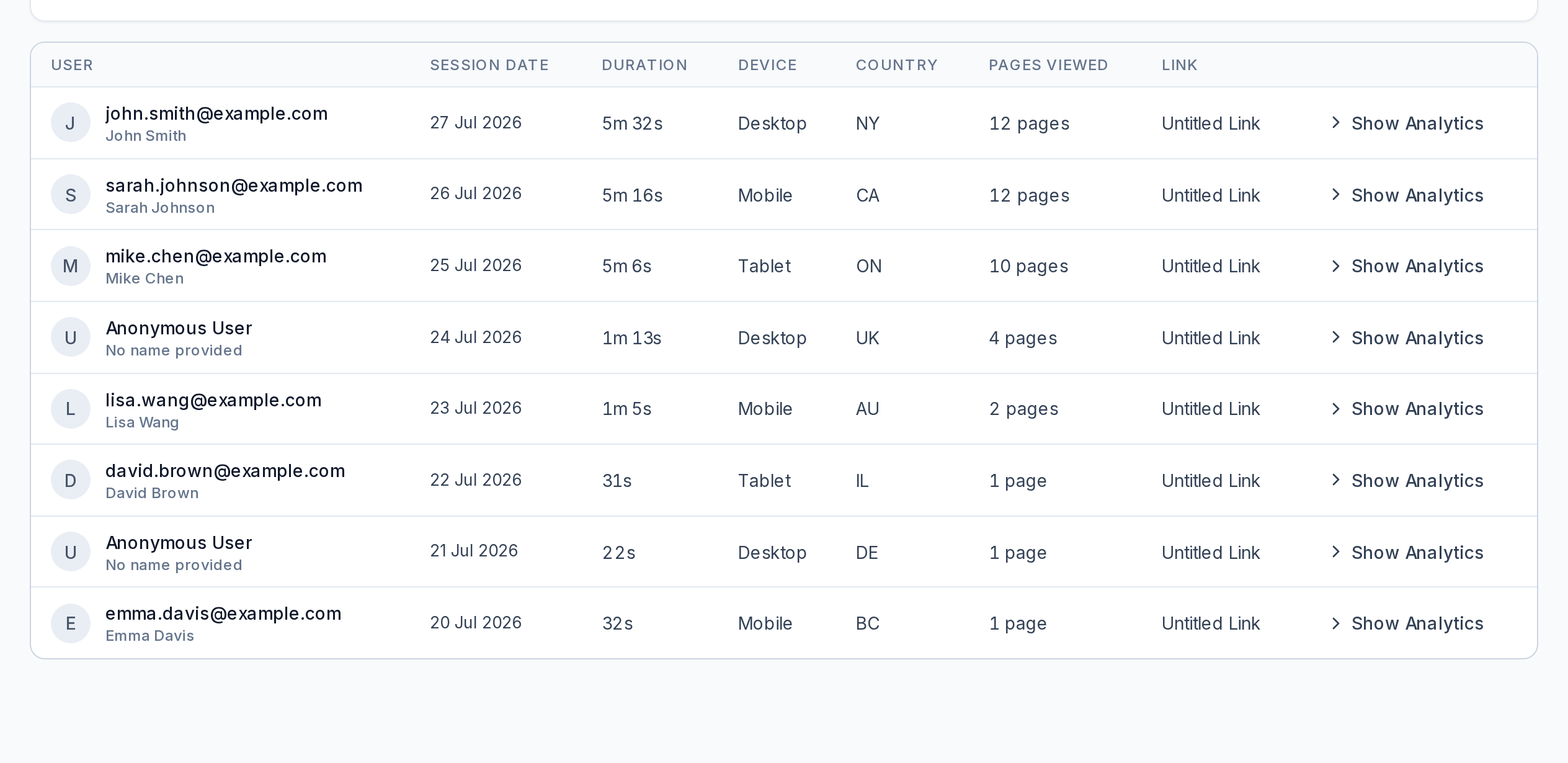
Turn on the email gate before you share the link, so each reading session carries an address. Without a gate you see anonymous sessions — device, country, pages read — but no name. An email gate records the address the viewer chose to type: it attaches a name to a session, it does not verify identity.
Sources
- Google Analytics 4 — Enhanced measurement (file_download event definition) (accessed 2026-07-28)
- Beacon — Pricing (free plan limits; lead-magnet page-view footnote) (accessed 2026-07-28)
- HubSpot — Pricing (free plan email sends; per-seat Starter/Professional/Enterprise); the documents-tool plan list and metrics come from knowledge.hubspot.com/documents/use-documents and knowledge.hubspot.com/reports/analyze-your-sales-content-with-the-sales-content-analytics-tool (accessed 2026-10-22)
- Kit — Pricing (Free plan, Creator, Pro) (accessed 2026-10-22)
- OptinMonster — Pricing (no free plan; introductory first-year prices; 14-day money-back guarantee) (accessed 2026-10-22)
- Encharge — Pricing (14-day trial; Growth and Premium tiers) (accessed 2026-07-28)
- Papermark — Pricing and free-plan link settings (accessed 2026-09-19)
- Peony — Pricing (accessed 2026-09-19)
- DocSend — Plans and pricing (accessed 2026-09-19)
- HummingDeck — Pricing (accessed 2026-09-19)
- Foleon — Analytics (accessed 2026-07-17)
- PDFTrackr — Pricing (our own product; free-plan limits and features) (accessed 2026-07-28)
See which leads actually read your lead magnet
Upload the PDF, share a tracked link instead of the file, and read each lead's furthest page. Free: 50 files, 50 links, 12 months of history, no card.
Create a free tracked linkKeep reading: how lead magnet tracking works, step by step, every free PDF tracker compared, and how free PDF tracking works.
Oleh Tsyupa
Founder, PDFTrackr
Has analysed over 3,000 tracked document-viewing sessions on PDFTrackr.